Navigating the Website
This website is designed to help you with your English listening and speaking skills in everyday conversation topics

Step One: Read the question
Each post is a separate question you may be asked. Please look at the topics in number order – otherwise they will not make sense

Step Two: Listen to the question
Press play to listen to the question from a native English speaker (me).

Step Three: Record your reply
Click the big red “Record” button and reply to the question. Remember, your reply should be at least 10 seconds long.
How to record your reply
This section highlights how to use the voice recorder and listen to your reply as well as sending it to us to see where you can improve.

Step One
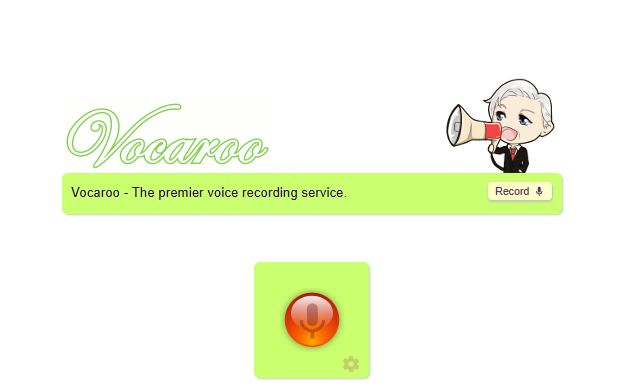
Click the red button to record your response. Please try to make it at least 10 seconds long.

Step Two
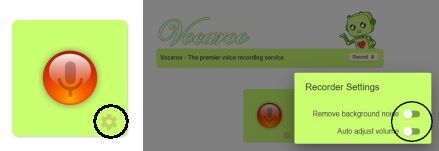
If you can not hear yourself on the playback, click the gear wheel and turn these settings off and try to record your response again

Step Three
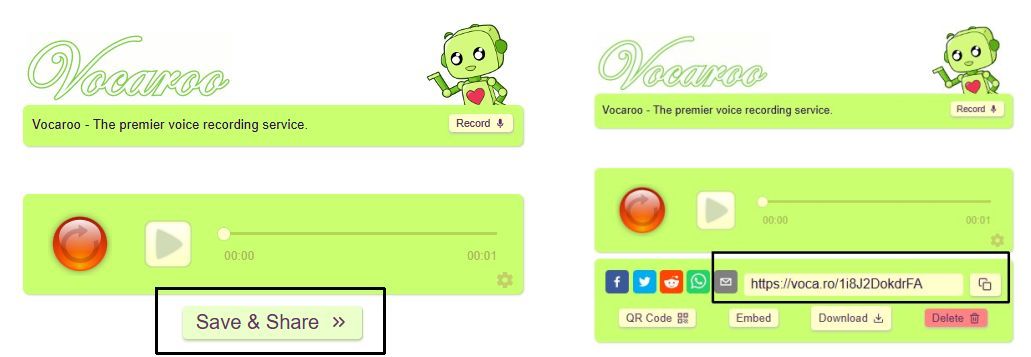
Once finished, click “Save & Share”. You can then copy the code and submit it into the comments below the post or you can click the email button to email it to me to listen to and give feedback.